
Struggling With Dates in Your MLA Paper?
You are staring at your paper header and something feels off. You know how to do MLA format date matters for your grade, but the rules never seem to stick in your memory. Maybe you wrote 5/12/2024 and your teacher circled it in red. That frustration is common, and you are not alone in this.
MLA style has clear rules about how you write dates, and once you learn them, you will never second guess yourself again. This article walks you through every part of MLA date formatting. You will learn the correct order, punctuation, and placement for dates in your heading, body text, and Works Cited page.
By the end, you will know exactly how to do MLA format date in any part of your paper without confusion.
What Is the Correct MLA Date Format?
MLA style uses the Day Month Year format. This means you write the day first, then the month, then the year.
Here is a simple MLA date format example:
15 March 2024
Notice there is no comma between the day and month. This is different from the American date style you probably grew up using.
Why MLA Chose This Order
MLA follows an international standard that many style guides use. It reduces confusion because Day Month Year does not require a comma, unlike Month Day Year.
I always tell students this trick. If the day comes first, skip the comma. If the month comes first, add a comma after the day.
MLA Heading Date Placement
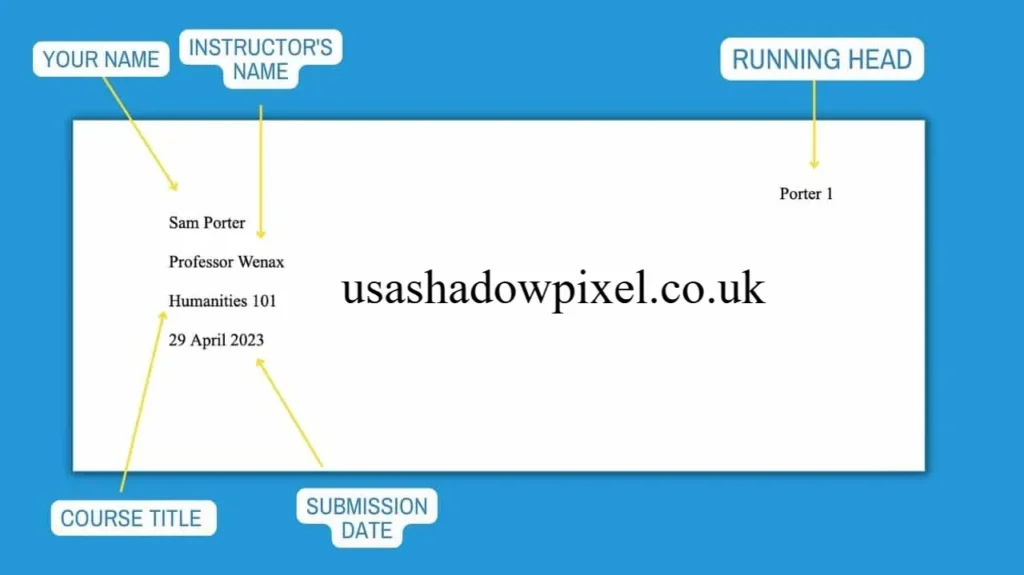
Your MLA heading date goes in the top left corner of your first page. It sits below your name, course, and instructor information.
Here is the standard order for your heading:
- Your full name
- Instructor name
- Course name and number
- Date
Each line should be left aligned and double spaced. The date is always the last line before your title.Source:scribbr
Example MLA Heading
Sarah Johnson
Professor Davis
English 101
15 March 2024
This format keeps your paper clean and professional. It also matches what most instructors expect to see.
Should the Month Be Spelled Out in MLA?
Yes, MLA style requires you to spell out the month fully in your heading and in the body of your paper. You should not use numbers for the month.
Correct: 15 March 2024
Incorrect: 15/3/2024
However, MLA does allow month abbreviations in your Works Cited entries for longer month names. These are the months you can abbreviate:
- Jan.
- Feb.
- Mar.
- Apr.
- Aug.
- Sept.
- Oct.
- Nov.
- Dec.
May, June, and July are always spelled out fully since they are already short.
Do You Use Commas in MLA Dates?
This question trips up a lot of writers. The rule is simple once you understand it.
- Day Month Year: No comma needed. Example: 15 March 2024
- Month Day, Year: Comma needed. Example: March 15, 2024
MLA prefers the first format without commas. It looks cleaner and avoids extra punctuation.
If you are citing a range of dates, use a hyphen between them without spaces. For example: 12-15 March 2024.
MLA Citation Date Format for Works Cited
Your MLA Works Cited date format follows the same Day Month Year rule. This applies whether you are citing a book, article, or website.
Here is a general structure for citing a source with a date:
Author Last Name, First Name. “Title of Source.” Title of Container, Publisher, Date, Page Numbers.
Example Citation With Date
Smith, John. “Climate Change Effects.” Environmental Journal, 12 Feb. 2023, pp. 45-50.
Notice the month is abbreviated here since it appears in a citation, not in your heading.
How Do You Cite a Publication Date in MLA?
When you cite a publication date, you place it after the container title and publisher information. If a source has no listed date, you can write “n.d.” which stands for no date.
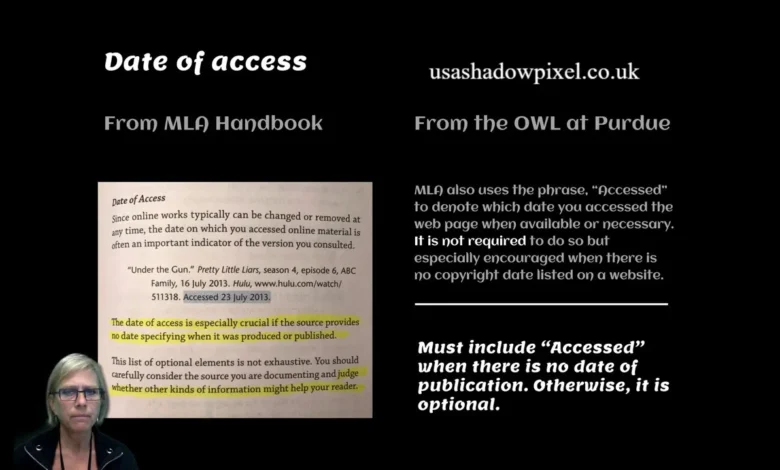
For online sources, MLA also encourages including your access date at the end of the citation. This is optional but helpful for websites that change content often.
Example:
“Understanding Climate Change.” National Geographic, 2023, www.natgeo.com/climate. Accessed 10 Apr. 2024.
MLA 9 Date Format Updates
The ninth edition of MLA did not change the core date rules. The Day Month Year format still applies across headings, in text citations, and your Works Cited page.
What changed slightly is the flexibility around digital sources. MLA 9 gives you more guidance on how to handle sources with multiple dates, like a webpage that was published once and updated later.
In these cases, you list the most recent update date if it is available. This keeps your citation accurate and current.
Common Mistakes to Avoid
Many students make small errors that cost them points. Here are the most common ones I see.
- Writing the date in Month Day Year format without checking MLA rules
- Adding a comma after the day in Day Month Year format
- Forgetting to spell out the month in the heading
- Using numeric dates like 3/15/24 instead of written dates
- Abbreviating May, June, or July
Avoiding these mistakes takes practice, but once you memorize the pattern, it becomes second nature.
Is the Date Required in an MLA Heading?
Yes, the date is a required part of your MLA heading. It shows your instructor when you submitted or completed the assignment.
Some instructors may ask you to skip the date if the assignment does not require it, but this is rare. Always include it unless told otherwise.
Quick Reference Chart
Here is a simple chart you can use anytime you need to double check your MLA assignment date format.
How Do You Say Hi in Spanish?
| Location | Format | Example |
|---|---|---|
| Heading | Day Month Year | 15 March 2024 |
| In text citation | Day Month Year | 15 Mar. 2024 |
| Works Cited | Day Month Year | 15 Mar. 2024 |
| No comma needed | Day Month Year | 15 March 2024 |
| Comma needed | Month Day, Year | March 15, 2024 |
Keep this chart handy while you write your next paper.
Final Thoughts on MLA Date Format
Learning how to do MLA format date does not have to feel overwhelming. Once you understand the Day Month Year rule, everything else falls into place naturally.
Remember to spell out the month in your heading, skip the comma, and abbreviate only in citations when needed. These small details show your instructor that you understand academic writing standards.
Have you run into date formatting issues in your papers before? Try applying these rules in your next assignment and see how much smoother your formatting looks.
Indeed Jobs Chicago
FAQs
How do you write the date in MLA format?
You write the date as Day Month Year, such as 15 March 2024, without a comma between the day and month.
What is the correct MLA date format?
The correct format is Day Month Year. This applies to your heading, in text citations, and Works Cited entries.
Does MLA use Day Month Year?
Yes, MLA style uses Day Month Year as its standard date format across all parts of your paper.
Where does the date go in MLA format?
The date goes in the top left corner of your first page, right below your course name, as the last line of your heading.
Should the month be spelled out in MLA?
Yes, in your heading and body text, you should spell out the month fully. Abbreviations are only used in citations.
Do you use commas in MLA dates?
No comma is needed for Day Month Year format. A comma is only needed if you use Month Day, Year format.
How do you format dates in MLA 9?
MLA 9 keeps the same Day Month Year rule but gives extra guidance for sources with multiple publication or update dates.
Is the date required in an MLA heading?
Yes, the date is a required element in your MLA heading unless your instructor specifically tells you to leave it out.
What is an MLA date example?
A common example is 15 March 2024 for your heading and 15 Mar. 2024 for citations.
How do you cite a publication date in MLA?
You place the date after the publisher name in your Works Cited entry, using the Day Month Year format with the month abbreviated.
Social Media Marketing Jobs in 2026
Author Bio:
Emily Carter is a writing tutor and academic content specialist with years of experience helping students master citation styles like MLA and APA. She enjoys breaking down confusing formatting rules into simple steps that students can actually remember. When she is not writing guides, she works one on one with students to improve their research papers.